Hyperlocal Visibility Intelligence

    Your Google Maps rank changes every block.Find the neighborhoods costing you customers.

    Traditional rank trackers show one number. Reality is messier — you might rank #1 outside your front door and #18 a mile away. AeroSearchAI scans your keyword from a real-world coordinate grid and reveals exactly where competitors are eating your lunch.

    Free 3×3 grid No credit card Runs in about a minute
    app.aerosearchai.com / local-grid
    LIVE SCAN

    Keyword · Brooklyn, NY

    "emergency plumber near me"

    1
    1
    2
    4
    7
    11
    15
    1
    1
    2
    3
    6
    9
    14
    1
    1
    1
    3
    5
    8
    12
    2
    1
    1
    2
    4
    7
    10
    3
    2
    2
    3
    5
    9
    14
    5
    4
    4
    6
    9
    14
    20
    8
    7
    8
    11
    15
    20
    —
    Top 3
    4–10
    11–20
    20+
    Real result

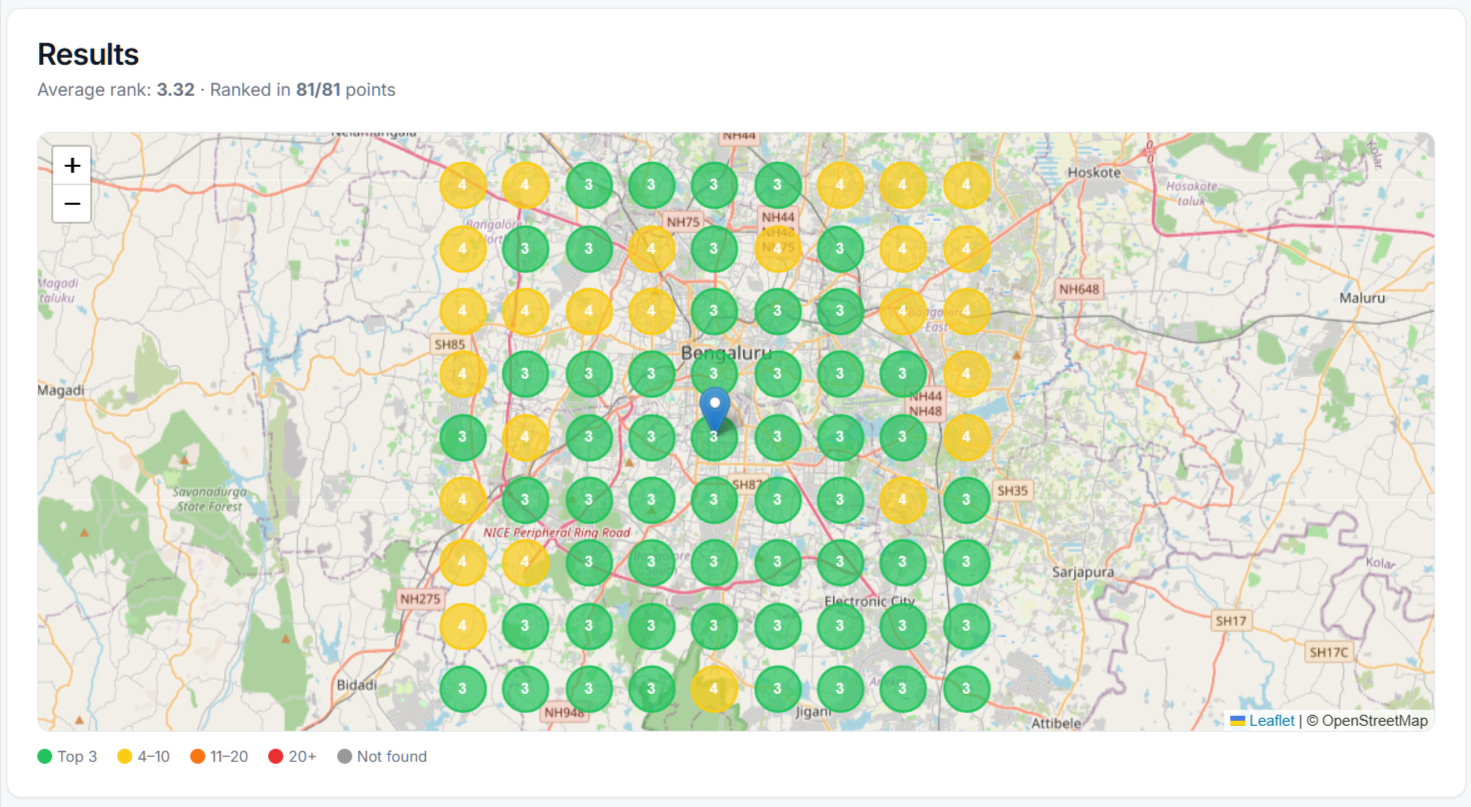
    This is what your local visibility actually looks like

    An 81-point Local Search Grid scan across Bengaluru — every pin is a real ranking pulled from that exact coordinate. Green means top-3, yellow means 4–10, red means you're invisible.

    Local Search Grid map showing Google Maps rankings across an 81-point grid in Bengaluru, with green markers for top-3 positions and yellow markers for ranks 4–10.

    3.32

    Average rank across the grid

    81 / 81

    Coordinates scanned

    ~60s

    Time to run the scan

    Why traditional rank trackers fail

    One number can't map a whole city.

    Old-school SEO tools check rank from one IP. Local customers search from thousands. Here's what that difference looks like.

    Traditional Rank Trackers

    • One global ranking number
    • Static, single-location data
    • No map heatmaps
    • Generic SEO metrics
    • Blind to neighborhood gaps
    • Can't show competitor zones
    AeroSearchAI

    Local Search Grid

    • Up to 81 real-coordinate rankings
    • Hyperlocal, block-by-block data
    • Color-coded geo-grid heatmaps
    • Neighborhood-level intelligence
    • Pinpoints visibility dead zones
    • Reveals competitor dominance areas
    How it works

    Keyword → heatmap in under a minute

    No setup. No code. No Google Business Profile required.

    01

    Enter your keyword

    “best dentist near me”, “24h locksmith”, anything customers Google.

    02

    Drop a pin

    Pick your business location or service-area center on the map.

    03

    Choose grid & radius

    From a tight 3×3 over 2km to a sprawling 9×9 over 25km.

    04

    Read the heatmap

    Color-coded ranks for every point. Spot weak zones instantly.

    What's inside

    A category-defining local visibility toolkit

    Street-level precision

    Each grid point uses real coordinates so results mirror what local customers actually see.

    Grids up to 9×9

    Single neighborhood or full metro — 81 data points in one scan.

    Radius up to 25 km

    Tight 2km for storefronts, wide 25km for service-area businesses.

    Color-coded heatmap

    Top-3, top-10, top-20, not-found — see weak spots without reading numbers.

    Historical tracking

    Re-run weekly. Watch red turn amber turn green as your SEO compounds.

    Competitor visibility

    See exactly who outranks you in each zone — and how to beat them.

    Project-based

    Every scan tied to a project so history, audits and rankings live in one place.

    Prove SEO ROI

    Before/after grids make local SEO progress impossible to argue with.

    Zero setup

    Works on any business — no plugins, no Google Business Profile required.

    Historical tracking

    Watch red turn green.

    Re-run scans on your own schedule and compare them side by side, so progress from your local SEO work is visible — not theoretical.

    Illustrative example — not a real customer result.

    Day 1
    Avg rank · 17.4
    12
    14
    18
    22
    25
    10
    11
    15
    20
    24
    8
    9
    12
    17
    21
    11
    12
    14
    18
    22
    15
    16
    19
    23
    —
    90 days
    Day 90
    Avg rank · 4.7
    2
    3
    4
    6
    9
    1
    2
    3
    5
    8
    1
    1
    2
    4
    7
    2
    2
    3
    5
    8
    3
    4
    5
    8
    12

    Top-3 grid coverage over time

    Sample data
    Week 1Week 12
    Built for local

    If customers find you on Maps, you need this.

    Plumbers & Trades

    Pain · Phone goes quiet outside a 1-mile bubble.

    Win · Find the suburbs you're invisible in.

    Dentists & Clinics

    Pain · New patients pick whoever ranks first nearby.

    Win · Dominate the map within insurance radius.

    Lawyers

    Pain · Practice-area searches vary by courthouse zone.

    Win · Own the zip codes your cases come from.

    Restaurants

    Pain · “Near me” traffic is hyper-local and brutal.

    Win · See where you're losing hungry lunch crowds.

    Agencies

    Pain · Selling SEO with vague charts and promises.

    Win · Win pitches and retainers with heatmap proof.

    Multi-location brands

    Pain · Underperforming branches hide in averages.

    Win · Spot the weakest branch before sales does.

    Scale with you

    Bigger grids. Wider radius. More wins.

    Start free with a focused 3×3 scan. Upgrade when you need full city coverage.

    Free

    $0/mo
    Grid size3×3
    Max radius2 km
    Data points9 points
    Monthly quota1 scan / month
    • Manual scans
    • 1 project
    • Last 3 audits saved
    Start free
    ★ Most popular

    Pro

    $59/mo
    Grid sizeUp to 7×7
    Max radius10 km
    Data pointsUp to 49 points
    Monthly quota20 scans / month
    • Manual scans
    • 3 projects
    • Last 25 audits
    • Before/after compare
    Choose Pro

    Agency

    $199/mo
    Grid sizeUp to 9×9
    Max radius25 km
    Data pointsUp to 81 points
    Monthly quota100 scans / month
    • 10 projects
    • Unlimited audit history
    • White-label reports
    • Priority support
    Choose Agency
    Deep dive

    The complete guide to local search grid tracking

    What is a Google Maps SEO grid?

    A Google Maps SEO grid is a visual matrix that shows how your business ranks across different physical locations in your service area. Instead of relying on a single local rank pulled from one IP address, a local search grid checks your position from dozens—or even hundreds—of real-world coordinates. Each point on the local grid represents what a potential customer sees when they search for your keyword from that exact block.

    Think of it as a heatmap for visibility. Green cells mean you are in the top three map results. Amber means you are ranking 4–10. Red means you are invisible. This block-by-block view is why businesses serious about local SEO rely on a geo grid rank tracker instead of legacy tools.

    Why area-based rank tracking changes everything

    Traditional local rank tools give you one number. But local search results are hyperlocal by design. A dentist might rank #1 across the street from the clinic and #18 two miles north. An area based rank tracker reveals those invisible gaps so you can fix them before competitors do.

    Area specific rank tracking is especially powerful for service-area businesses. Plumbers, HVAC contractors, and law firms do not serve customers from a single address—they cover whole zip codes or cities. A geo location rank tracking approach lets you see exactly which neighborhoods send you leads and which ones send leads to someone else.

    Local search grid vs. traditional local rank tools

    Legacy rank trackers were built for national SEO. They check one location, often from a data center, and report a single position. That works fine for a blog post competing across the country. It fails completely for a pizza shop or roofing company where every block matters.

    A local search grid Google scan queries the actual Google Maps algorithm from real coordinates. It accounts for proximity, prominence, and local intent the same way a human searcher does. The result is not a guess—it is a picture of your real-world local search grid visibility.

    How to grid my business for local SEO

    If you want to grid my business and understand your true map coverage, the process is simple. Pick your primary keyword—something a customer actually types, like “emergency plumber near me” or “best sushi restaurant.” Drop a pin at your business address or the center of your service area. Then choose a grid size and radius that matches how far your customers travel.

    Grid my business local SEO scans work best when you run them consistently. Check before and after you build citations, earn reviews, or publish location pages. The color-coded matrix makes progress impossible to miss. When red cells turn amber and amber turns green, you know your optimization is working.

    Choosing the right local SEO grid tool

    Not every local SEO grid tool is built the same. Some only show a static snapshot. Others lack historical tracking, so you cannot compare this month to last month. The best local search grid tracking platforms give you flexible grid sizes, adjustable radius, competitor visibility at every point, and before-and-after comparisons.

    Look for a tool that ties scans to projects, stores history automatically, and does not force you to connect a Google Business Profile just to run a scan. Flexibility matters—especially if you run local SEO grid scans for multiple locations or clients.

    Try a local search grid free

    The fastest way to understand the value of a geo-grid is to run one yourself. A local search grid free trial—like AeroSearchAI's 3×3 scan—lets you see your real visibility without entering a credit card. Most businesses discover at least one dead zone they never knew existed.

    Start small, prove the concept, then scale to larger grids when you are ready to dominate your entire service area. Whether you run a single storefront or manage ten locations, block-by-block visibility intelligence is the difference between hoping your SEO works and knowing it does.

    FAQ

    Questions, answered

    How is this different from checking my Google Maps rank manually?

    Manual checks only show results from one location — wherever your phone is. The Local Search Grid runs your keyword from dozens of real-world coordinates across your service area, revealing exactly what every potential customer sees from their block.

    What is a geo-grid heatmap?

    A geo-grid divides your service area into a matrix of real-world points. We query Google Maps from each point and color-code your rank — green for top 3, amber for top 10, red for invisible. The result is a visual map of your actual local SEO visibility.

    Do I need a Google Business Profile?

    No. The grid works for any business name and keyword. A claimed and optimized GBP obviously helps you rank better, but it's not required to scan.

    How often should I scan?

    Weekly for active local SEO campaigns, monthly for steady businesses. Always scan before and after any optimization (new reviews, citations, content) to measure impact.

    How accurate are the rankings vs. real searchers?

    Each grid point queries Google with real coordinates, so results closely match what someone standing there would see. Some natural variability exists because Google personalizes results — but patterns are consistent and highly actionable.

    Can I track competitors in the map pack?

    Yes. Each grid point shows the top businesses ranking for your keyword at that location, so you can see exactly who's dominating each zone and what to learn from them.

    Free scan · No credit card

    Stop guessing where you rank.
    Start seeing every block.

    Run your first 3×3 grid scan for free and see where you actually rank across your service area — block by block.

    Reveal My Map Visibility

    Free 3×3 grid · No credit card · Runs in about a minute